
/**
 * Add Custom Menu in Dashboard Page.
 */
function custom_addon_menu( $sidebar_menu ){
  $sidebar_menu[‘news’] = array(
    ‘title’		  => ‘News’,
    ‘permalink’ => get_the_permalink( pzfm_dashboard_page() ).’?dashboard=news’,
    ‘icon’ 		  => ‘fas fa-newspaper pzfm-icon-color’,
    ‘submenu’   => false,
    ‘submenu_items’ => array()
  );

  return $sidebar_menu;
}

add_filter( ‘pzfm_after_sidebar_menu_items’, ‘custom_addon_menu’);
Note: The menu key and dashboard parameter should be the same if the redirected to another page in dashboard to make the sidebar active.
Parameters of Sidebar Array:
- Title – The name showing in the sidebar.
- Permalink – the link to where the menu to go.
- Icon – Icon to be used beside the title in sidebar.
- Submenu – if the menu have submenus
- Submenu Items – Names of submenu items.
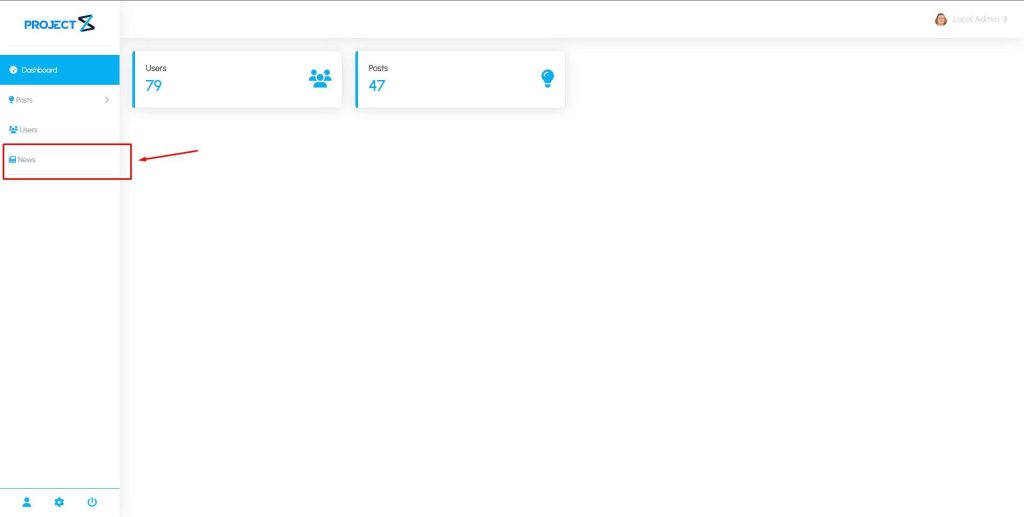
Additional Information:
Icon – Icons used fontawesome class version 6.2.1 and pzfm-icon-color is added to make the menu same color with the set color in settings.
Submenu and Submenu Items – If the menu have submenu set to true and to add the items add the names in the submenu_items as array.
Setup Page
To setup a page for the new add custom menu, Using the action hook news_dashboard_page.
/**
 * Setup News Page in Dashboard.
 */
function news_dashboard_page(){
  if( isset($_GET[‘dashboard’]) && $_GET[‘dashboard’] == ‘news’ ){
		?>


							This is News Page


		<?php
  }
}

add_action( ‘pzfm_dashboard_page’, ‘news_dashboard_page’ );

Note: To set a specific page change the condition of the in the function equivalent to the menu key used above.